Chrome extension · Free for the first 100 products

Export any Shopify store’s catalog to CSV.
One click, right on the page.

Open a Shopify store, click the icon, and get every product, variant, price, SKU and image URL in a spreadsheet-ready file. Nothing to install on the store, no API key, no account — and your catalog never leaves your machine.

Also for Microsoft Edge and Opera · No sign-up · Runs 100% locally

Not in the browser stores yet — the listing is under review. This page will link straight to it the moment it’s live.

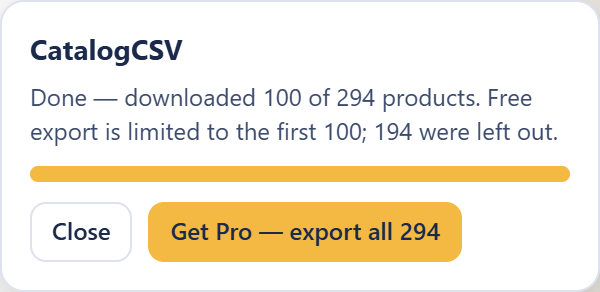
Catalog Exporter running on a Shopify store: the overlay in the corner says Done — downloaded 100 of 294 products, with a Get Pro button to export all 294.
The export runs inside the store’s own tab. Close the popup, switch tabs — it keeps going.

How it works

  1. 1
    Open the store

    Any public Shopify storefront. Password-protected store you have access to? Sign in first — the extension uses the tab’s own session.

  2. 2
    Click the icon

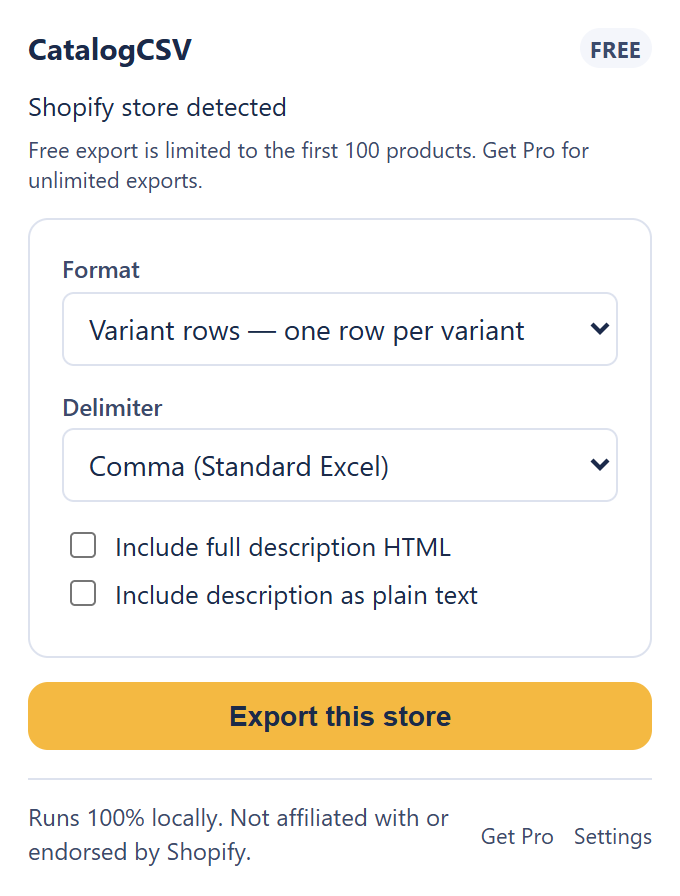
    Catalog Exporter detects the store, and you pick a format: variant rows, Shopify import CSV, or image URLs only.

  3. 3
    Export

    It pages through the whole catalog — 250 products at a time, as fast as the store allows — and downloads one CSV. Open it in Excel, Sheets or Numbers.

The extension popup on a Shopify store: Shopify store detected, a format and delimiter selector, and an Export this store button.

What you get

Three export formats

Variant rows — one row per variant, 26 columns: title, vendor, type, tags, price, compare-at price, SKU, options, availability, weight, image URLs. Shopify import CSV — Shopify’s own bulk-import format, every product as an unpublished draft. Images only — every image URL with position, alt text and the variants it belongs to.

Built for Excel

A UTF-8 marker so accents and emoji display correctly, automatic escaping of anything that looks like a formula, and a semicolon option for European Excel. Files open cleanly — no import wizard.

Nothing installed on the store

It reads the store’s public product list — the same data the storefront already loads — from a normal browser tab. No app, no admin access, no API key. Works on any Shopify store, including ones you don’t own.

Private by design

Your catalog is turned into a file on your machine and never uploaded anywhere. The extension asks for activeTab only — access to the one tab you click on, in that moment. No <all_urls>, no telemetry, no analytics.

Pricing

Every format, every column and every option is free. The only thing a license changes is how many products fit in one export.

Free

$0
  • Exports up to 100 products per store
  • All three formats, all columns, all delimiters
  • No account, no sign-up
Add to Chrome

Pro Unlimited

or billed yearly

  • Unlimited products per export
  • Everything in Free
  • One key, up to 3 browsers or machines
  • Cancel any time in the customer portal
Subscribe

Doing a one-time migration? Subscribe, export, cancel — you keep access for the time you’ve paid for. Already have a key? Paste it into the extension’s Settings page, or recover it here if you lost it.

The extension’s Settings page with a Pro badge: Active — unlimited exports.
After activating: a Pro badge in Settings, and the 100-product limit is gone. Nothing else changes.

Questions

Does it work on stores I don’t own?

Yes. Shopify publishes every public storefront’s product list at a public, unauthenticated address, and that is all the extension reads. If you can browse the store, you can export it. Stores behind a password page need you to sign in first, in the same tab.

What data can it get — and what can’t it?

Everything the public product list contains: titles, descriptions, vendors, types, tags, all variants with prices, compare-at prices, SKUs, options, weight and availability, and every image URL. It cannot see inventory quantities, cost prices, customers or orders — those live behind the store’s admin, which the extension never touches.

Why does my export stop at 100 products?

That is the free tier. The extension still reads the whole catalog so the count is accurate, then trims the file to the first 100 products. A Pro license removes the limit for every store, every export.

Do I need an account?

No. A Pro purchase gives you a license key, and the key is the whole login. Paste it once into the extension’s Settings page. One key covers up to three browsers or machines, and you can release one any time from Settings.

Where does my data go?

Nowhere. The CSV is built and saved on your machine. The only thing the extension ever sends is your license key — to our own licensing service, when you activate it and at most once a week after that. There is no telemetry and no analytics.

Can I cancel?

Yes, any time, in the payment provider’s customer portal — the link is in your receipt email — or by emailing us. You keep access for the period you have already paid for. See refunds & cancellation.

Export your first store in under a minute.

Free for the first 100 products. No account, nothing installed on the store.

Add to Chrome